Friday, 31 March 2017

Effects, (Title, Audio and Video)

For scene 4, due to it being a flashback in my screenplay I decided to change the scene into black and white which was inspired by the convention of Film Noir.

The effects I used was the image control to change it to black and white. However, I found that the filter used made the scene look faded and a washed out way. I change this by decreasing the brightness and increasing the contrast to make it look more gritty.

In addition I decided to use the black and white effect on the scenes that were flashbacks or in the past so the audience can be able to determine the different stages in the timeline of the trailer, which hopefully will allow the audience to understand the storyline and plot.

Before


Changing the contrast and brightness
 
The changes to the brightness was done by lowering it by 2 giving it a more darker effect which goes along with the convention of gangster films. The contrast was also changed to 10

After


Effects Used


On the effects tab, the video effects include the use of image control which I used on the scene to create the black and white effect. I also included one of the colour correction effect making use of the brightness and contrast to change the depth of the scene.


----------------------------------------------------------------------------------------------------------------------------------

While editing, I found that one of my clips looked odd as it didn't quite follow the 180 degree rule so I decided to use the effect of transformation to flip the clip

Before


Transform


After


Using the effect
 

----------------------------------------------------------------------------------------------------------------------------------

Titles

I looked at Art of the Title for designs of titles


I was influenced by the title of Sin City so I implemented the stile of black and white, making some of my words in red allowing it to stand out.


I also added the screen shot of my billing board from my poster to my trailer so the identity of my brand can be continous


----------------------------------------------------------------------------------------------------------------------------------
Audio Gain


For the voices I used the Audio Gain to increase them so the conversation can be heard properly


I decreased the soundtrack to make it more audible


Audio Effects
Using Exponential Fade for the music


I edited the gunshot effects onto my trailer


---------------------------------------------------------------------------------------------------------------------------------

Video Transitions


---------------------------------------------------------------------------------------------------------------------------------


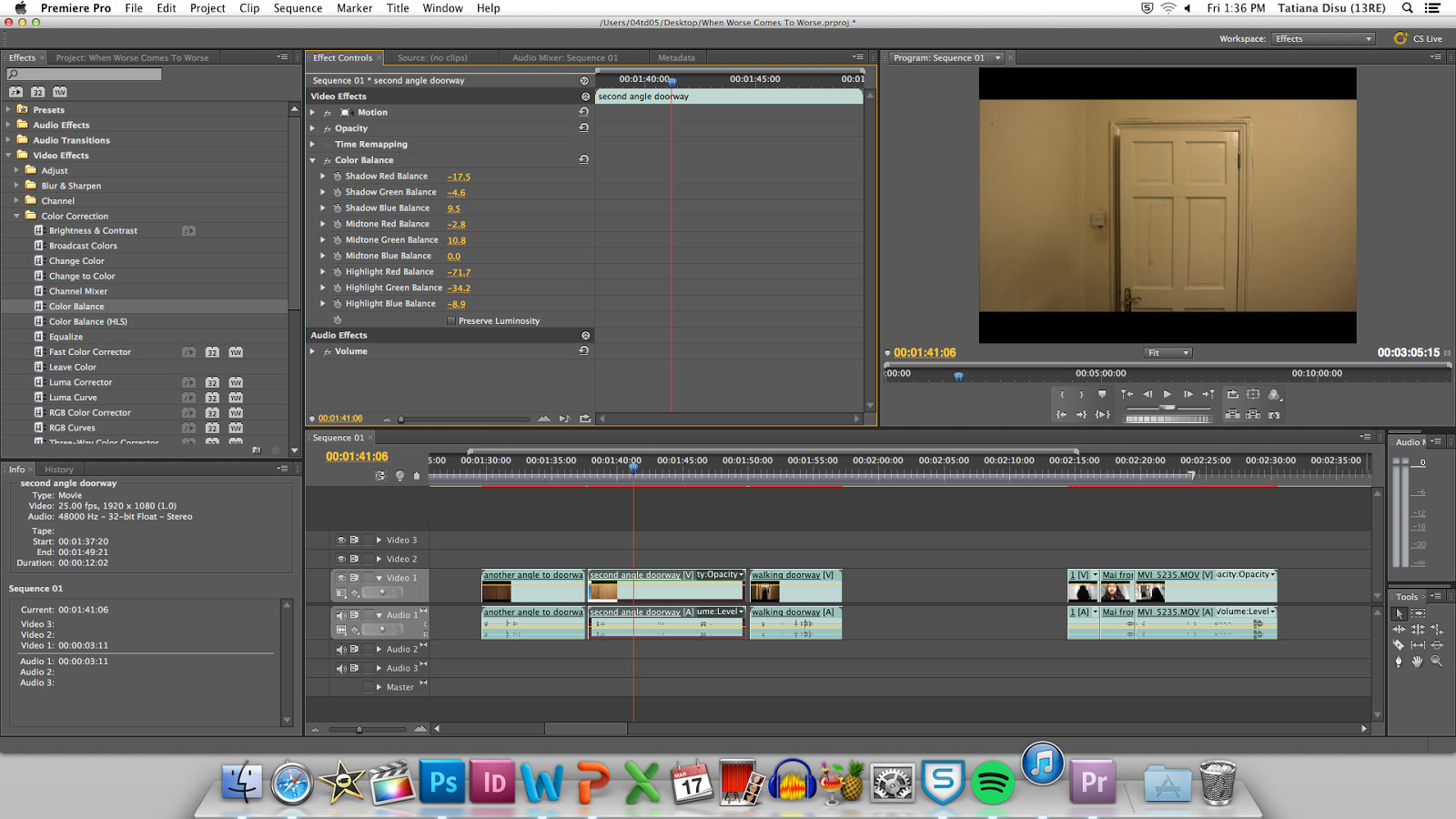

Trying out Effects

Colour grading

Definition
Colour grading is the process of altering and enhancing the colour of a video or image.
The use of the red green and blue channels can adjust brightness of various different levels of color.
The enhancements are used to change the mood or scenery of the video.

The RGB curve effects can be used best for cross processing
The colour balance does subtle changes to the hues along with the tint and filters FX
The 3 way colour corrector allows you to adjusts shadow, mid tones and highlightes of the video using compression.

Process
I first changed the window to show the effects workspace.
Then the use of the tab effects opened up a list of different effects that could be applied to the video. The video effects was chosen which lead me to change the colour balance as I inserted it to the clip I wanted to be changed.

Colour correction
Before


After (decreased the highlights on the clip)


Changed the midtones and shadows to further develop the video to look similar to the crime genre


---------------------------------------------------------------------------------------------------------------------------------


---------------------------------------------------------------------------------------------------------------------------------


Friday, 24 March 2017

Focus Group Part 1

Interview/ Focus Groups

For my audience research, I decided to make a focus group like an interview so it can be more personal and informative to allow me to understand what audiences would appreciate in my film trailer on the Gangster genre.

For the formation of the questions, I took some of my inspiration such as The Godfather, Live by night, and Once Upon a Time in America showing their trailers to my focus group. This informed me on what the audience would appreciate more of while watching a Gangster trailer and what to imitate from them. In addition, the focus group talked about their thoughts on the actual genre as a whole and what they know or have heard about it.

My decision to split of the focus groups and interview them individually was due to getting their own specific thoughts on the genre so that they are not influenced by the other people showing the raw and creative side to each person thinking, which I found useful as it adds to my target audiences demographic and psychographics.

I1

Friday, 10 March 2017

Editing


Editing Scene 5
Consisting of a medium back shot, low angled close up, and a wide shot.
---------------------------------------------------------------------------------------------------------------------------------


Editing Car Scene
Trying out the car scene which is inspired by the trunk shot scene in Quentin Tarantino films.


--------------------------------------------------------------------------------------------------------------------------------

Editing Scene 4


I found it was useful to scale down the clips to 41 from the video effects as it fitted the scene effectively.


I uploaded what I had filmed for scene Scene 2 and 3 which I filmed on Wednesday. I then worked on editing scene 4 and combining two clips from which were shot separately.

--------------------------------------------------------------------------------------------------------------------------------


Editing Scene 2 and 3
Consisted of wide and long shots, going to be fast quick shots. Includes effect of black and white due to it being in the past.

----------------------------------------------------------------------------------------------------------------------------------
Establishing Shot


Trying to create a slow motion effect for the clip of the establishing shot

Using Adobe After Effects


Friday, 3 March 2017

Filming

While Filming

The establishing shot

The problem that I encountered was the weather while filming the tripod was unstable due to the wind.  Also due to the filming being outside, there were people constantly getting in the shot which increased my time for filming.
The scene that I chose to do was a zoom in with the establishing shot of the field with buildings in the outskirts/ background.

Second establishing shot 

While going to film my 3rd scene, I found a better location sight for my establishing shot. Filming this scene was rather fast as it just consisted of different zoom in, zoom out and pans which some where 180 and 360. The slow motion can be edited in later. 

The Car Scene 

The car scene was rather quick to film compared to the other scenes. The problem I encountered with this scene was that I had to position the camera in an angle in the booth of the car, however, when the actor closed the booth the camera moved, for this we placed it against an object to keep it in place. I decided on a match on action on the booth being opened and closed. Inspired by the trunk shots used by Quentin Tarantino. 

The Bathroom Scene (Scene 5)

For the bathroom scene, I had to use a prop which was the mirror.
The shots I used
The back shot = was the easiest due to only filming behind her
The sideways shot= this was a bit tricky as I couldn't get captured in the shot that was being filmed as there was a mirror cabinet over head and a mirror in front of her.
The close-up shot= For the close-up angle I mounted the camera directly in front of her and placed the camera at a slightly higher angle to get her full face.

The Bedroom Scene (Scene 4)

I filmed the hallway scene as a long shot, and did a match on action to the door opening and closing as the actor (the hit man) entered the room. From there on I decided to film from all the four points on the room which allowed me to follow the actors movements once he enters the room and stands in front of the others. 
Problems encountered while filming this scene was that one of my actors who was a child had to be shot at a different location because of the violence in the scene. The solution was to film him in the closet and edit him into the scene. 
I found while filming that dialogue was easy to follow and remember however some of the content from my screenplay couldn't be filmed because it didn't work with the scene. 
Consideration for the scene to be in black and white inspired by film noir. The black and white scenes will represent the flashbacks.

The Childhood Scene (Scene 2 and 3)

The childhood scene included the use of children for my actresses and actors. There were a lot of retakes due to trying to convey what was on the screenplay. Overall, It went great as I filmed location wise next to a sort of alleyway parking lot, and the 2nd scene was filmed as a long shot to allow me to do quick shots using editing later. The 3rd scene had to be turned into a wide shot which panned to the left showing the reaction of the main character and her walking away. 
The problem encountered was the fact that due to it being filmed outside there was a lot of people passing by which halted the filming process for a bit. 

Side Note: Whilst filming in this location I tried to get a shot of an airplane in flight. However, it looked shaky since the tripod couldn't be used and unpredictable as the timing of when the airplane was coming couldn't be foreseen. 


Wednesday, 1 March 2017

Film Noir

Film Noir


----------------------------------------------------------------------------------------------------------------------------------


----------------------------------------------------------------------------------------------------------------------------------


-----------------------------------------------------------------------------------


----------------------------------------------------------------


--------------------------------------------------------------------------------------------------------------------------------

Double indemnity
----------------------


Plot


The Third Man
---------------------

Plot


The Big Sleep
------------------


Plot


------------------------------------------------------------------------------------------------------------


Note: This post is purposefully done with only images